
Roofing measurement, pricing and quoting
A Bluebeam alternative when the goal is a roofing quote
Measure the roof, apply your saved pricing rules and produce the customer quote from the same job. Work on phone, tablet or desktop, with Smart Assistant for supported account questions and changes.
Keep Bluebeam when you need its PDF editing, Studio collaboration, CAD workflows or established Excel links. QuoteCore+ is not a general PDF-document replacement.
Tell Shaun how you currently work. He’ll show you how QuoteCore+ could make it faster and easier, and give you his #1 tip for winning more of the jobs you already quote.
Keep document work separate from the quoting decision
Bluebeam is a document and collaboration tool with measurement, custom formulas and Excel links. Its web and mobile tools also include measurement, and Max adds AI-driven document actions. QuoteCore+ takes a different route: roofing measurements feed saved pricing and customer documents inside one job. The useful comparison is the work after measuring, not whether Bluebeam can measure or use AI. You can retain Bluebeam for project documents while using QuoteCore+ for your own estimates and quotes.
Can QuoteCore+ replace Bluebeam Revu?
Replace the work you no longer need to split across tools, not every Bluebeam capability.
QuoteCore+ does not replace Studio collaboration, advanced PDF editing, CAD plug-ins, batch document processing or an established Quantity Link workflow.
Measure, price and quote
Use your own source material and saved pricing to create customer documents.
Work from your phone
QuoteCore+ supports takeoff, saved jobs and quoting on phone, tablet and desktop.
Ask, then review
Smart Assistant retrieves records and proposes supported changes. You confirm important edits.
Keep specialist tools when needed
QuoteCore+ does not replace Studio collaboration, advanced PDF editing, CAD plug-ins, batch document processing or an established Quantity Link workflow.
Bluebeam vs QuoteCore+: workflow and capabilities
Capabilities below distinguish documented features from unverified equivalents. A missing confirmation is not evidence that a competitor lacks a feature.
PDF viewing / markup
Bluebeam Revu
QuoteCore+
Digital roof takeoff
Bluebeam Revu
QuoteCore+
Roofing-specific geometry types
Bluebeam Revu
QuoteCore+
Slope-aware measurement
Bluebeam Revu
QuoteCore+
Reusable tools / logic
Bluebeam Revu
QuoteCore+
Custom formulas / cost fields
Bluebeam Revu
QuoteCore+
Excel integration
Bluebeam Revu
QuoteCore+
AI assistance
Bluebeam Revu
QuoteCore+
Drawing overlays / batch comparison
Bluebeam Revu
QuoteCore+
Studio collaboration
Bluebeam Revu
QuoteCore+
CAD plug-ins / workflows
Bluebeam Revu
QuoteCore+
Customer quote generation
Bluebeam Revu
QuoteCore+
Quote acceptance / tracking
Bluebeam Revu
QuoteCore+
Material order output
Bluebeam Revu
QuoteCore+
Invoice from accepted quote
Bluebeam Revu
QuoteCore+
Multi-trade use
Bluebeam Revu
QuoteCore+
Platform
Bluebeam Revu
QuoteCore+
Pricing model
Bluebeam Revu
QuoteCore+
Conversational actions
Bluebeam Revu
QuoteCore+
An unverified equivalent was not established in the sources reviewed. It may exist in another product, plan or integration. Ask the vendor about the exact workflow you require.
Sources and comparison scope
This comparison is published by QuoteCore+ and is based on the linked vendor documentation, not a hands-on performance test. Feature availability, plans and previews can change. Unverified equivalents are marked explicitly, not scored as missing features.
Vendor documentation reviewed: 27 September 2026.
- Bluebeam tools and plan comparison
Measurement, custom columns, Excel, PDF collaboration and web/mobile feature scope. Per-user annual prices; Max is explicitly introductory.
- Bluebeam Max
AI-driven markup and custom-column actions through MCP; some drawing tools carry preview qualifications.
Bluebeam vs QuoteCore+ pricing
Compare the required feature set, billing commitment and any external measurement costs. These are different products, not a like-for-like savings guarantee.
Bluebeam Revu pricing
- BasicsAnnual billing.US$260/user/year
- CoreAnnual billing.US$330/user/year
- CompleteAnnual billing; includes Quantity Link.US$440/user/year
- MaxIntroductory price; verify renewal and preview availability.US$590/user/year
Official vendor pricing reviewed 27 September 2026. Competitor figures are US prices; account, region, tax, discounts and billing conditions may change the total. Check the linked source before buying.
Bluebeam tools and plan comparisonTry QuoteCore+ before you pay for a plan
Create a real Free Workspace, use it on your own jobs and learn which features actually help. Current paid configurations range from US$29 to US$259 per month when you need more features, capacity or usage.
- No card and no expiry. Keep using the Free Workspace for as long as its allowances suit your business.
- Guided when useful. An optional Guided Walkthrough teaches the core workflow inside a preconfigured fictional roofing business.
- Exact plan later. Build your paid configuration inside Billing only when you know what you need.
PDF collaboration remains a requirement
- Bluebeam Revu
- Keep the Bluebeam plan that covers your document work.
- QuoteCore+
- QuoteCore+ would be an additional estimating subscription, not a replacement saving.
Your main requirement is customer quoting
- Bluebeam Revu
- Check the PDF, spreadsheet and customer-document steps in your existing setup.
- QuoteCore+
- Current configurations start at US$29/month. Compare the full workflow rather than assuming the lowest headline price covers the same job.
Illustrative workflow comparisons, not equivalent bundles. External imagery, measurement reports, setup time and separately required services are not included in the QuoteCore+ subscription.
One job. Three ways to work.
Measure it, enter it or ask Smart Assistant
Choose the path for the task. You can switch between direct controls and the Assistant; these are not three steps you must complete in order.
01
Measure in the app
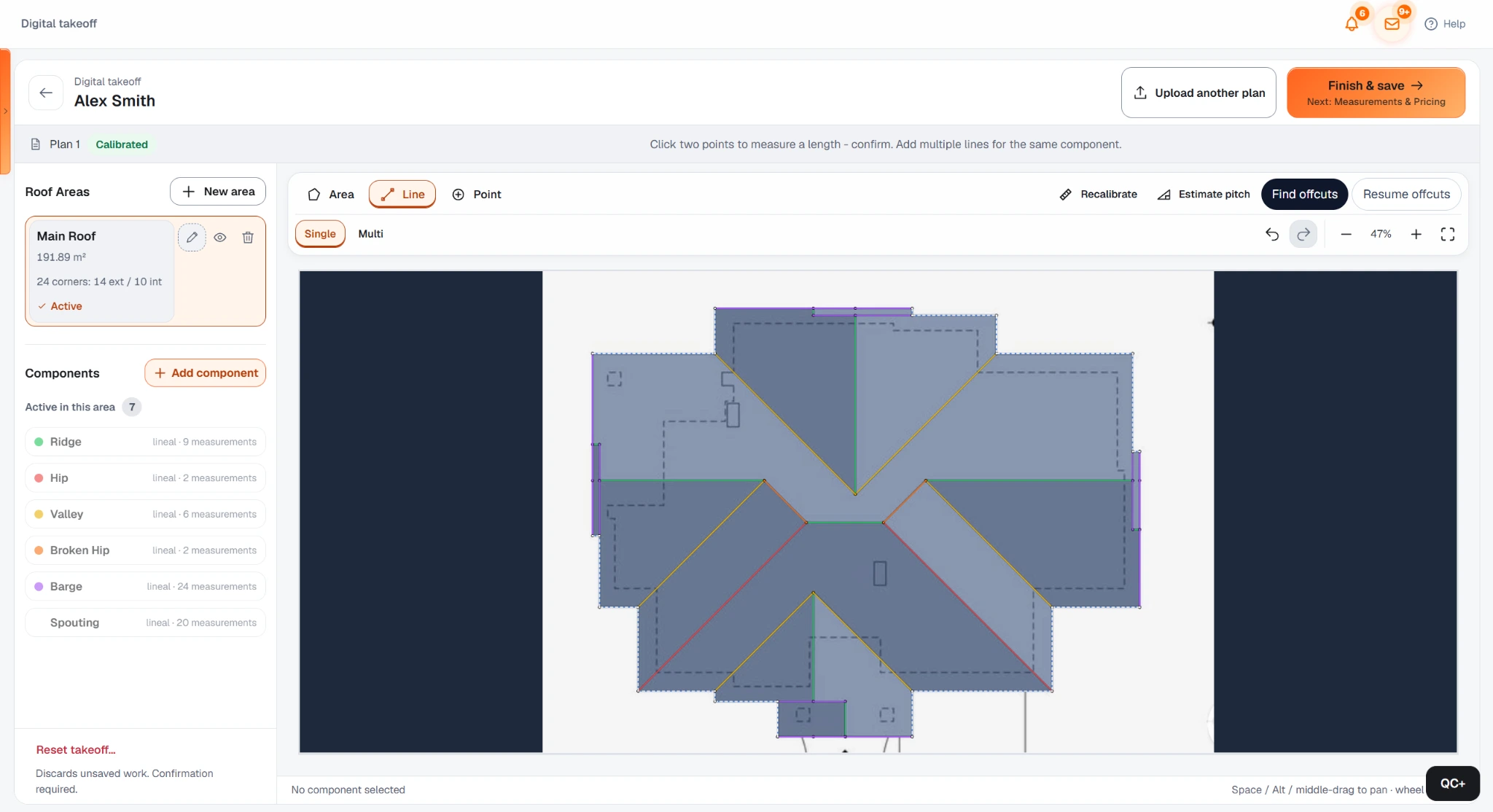
Measure the roofing plan on phone, tablet or desktop. Review scale, outline and components before relying on quantities.
Explore digital takeoff
02
Enter your measurements
Keep your existing measurement method. Enter known dimensions into Smart Components rather than rebuilding the customer quote elsewhere.
See saved pricing rules
03
Ask Smart Assistant
Ask for a saved quote or supported rate change by text or voice. The Assistant works on account records, not Bluebeam PDF markups.
Explore the app features
Your inputs and saved pricing rules remain the basis of the quote. Smart Assistant access and supported actions depend on the available feature and permissions. Important changes are proposed for confirmation.
From the measurement to the customer quote
Choose the entry point that fits the job. A QuoteCore+ workspace keeps the measurement, your pricing rules and customer documents connected.
Measure or enter known dimensions
Measure the roofing plan on phone, tablet or desktop. Review scale, outline and components before relying on quantities. Alternatively, enter dimensions you have already checked.
Review before using the quantities
Check scale, pitch and visible geometry before pricing. On a clear, correctly calibrated roof plan, Roof Scan Assist can complete the roof geometry accurately. Plan quality and complexity determine when manual adjustment is more likely, and every result remains editable.
Apply the rules you actually use
Smart Components calculate material, labour, waste and pricing using your saved setup. Check quantities and allowances against the job. New rules still need configuring and validating.
Review the quote and keep the job connected
Prepare the customer quote from the same job. Use the normal app builders for later orders and invoices. Smart Assistant can retrieve records or propose supported changes; it does not replace takeoff checks or create orders and invoices for you.
See the measurement and pricing workflow

Switching from Bluebeam Revu
Work through one representative job before switching. Keep any specialist service or integration you still require.
Today with Bluebeam Revu
Your measurement results feed a separate quote document
With QuoteCore+
Apply saved pricing and prepare the quote inside the same QuoteCore+ job.
Reduce a handoff when a separate document workflow is unnecessary.
Today with Bluebeam Revu
You use Bluebeam for drawing review and collaboration
With QuoteCore+
Keep Bluebeam for those tasks and enter relevant dimensions into QuoteCore+.
Avoid pretending one tool replaces every document function.
Today with Bluebeam Revu
You need a price update from site
With QuoteCore+
Retrieve the quote on mobile and review an Assistant-proposed rate adjustment.
Use account data and your own rules, not an invented AI price.
Which one fits your business?
An honest starting point - both tools are good at what they do.
Choose Bluebeam Revu if…
The project team works in Studio or specialist PDFs
Keep the collaboration and document tools required by the project.
Your Excel-linked estimating system works well
A validated spreadsheet workflow is an asset, not something you must discard.
Choose QuoteCore+ if…
The recurring task is a measured job and customer quote
You want measurements and your own rates in the same saved workflow.
You work between site and office
You need a connected QuoteCore+ workspace on phone, tablet and desktop, not just a place to view documents.
You want help without giving up control
Use Smart Assistant for supported retrieval and changes, while keeping manual controls available.
See how measurements become a quote
This existing walkthrough shows the measurement and pricing workflow. It is not a new mobile or Smart Assistant demonstration.
When to keep Bluebeam
QuoteCore+ does not replace Studio collaboration, advanced PDF editing, CAD plug-ins, batch document processing or an established Quantity Link workflow.
The project team works in Studio or specialist PDFs
Keep the collaboration and document tools required by the project.
Your Excel-linked estimating system works well
A validated spreadsheet workflow is an asset, not something you must discard.
Common questions
Is Bluebeam desktop-only?
No. Revu is the Windows desktop application, but Bluebeam also includes web and mobile tools with measurement features. QuoteCore+'s distinction is its connected job-pricing and quoting workflow, not exclusive mobile access.
Can Bluebeam use AI to change documents?
Bluebeam Max advertises AI integrations that can create or edit markups and custom columns. Some drawing-review capabilities are marked preview. QuoteCore+ Smart Assistant is aimed at supported account tasks instead.
Does QuoteCore+ replace Studio or Quantity Link?
No. Keep Bluebeam for those functions where they are part of your process. QuoteCore+ is an alternative for a roofing measure-to-quote workflow, not every PDF or Excel integration.
Can I keep using Excel for pricing?
Yes. There is no need to replace a method that serves you well. QuoteCore+ becomes useful when saving pricing rules with the measured job reduces work you otherwise repeat.
Can I measure, price and quote from my phone in QuoteCore+?
Yes. In your QuoteCore+ workspace you can upload a plan, measure or use the reviewed AI scan workflow, apply saved pricing and prepare the quote on phone, tablet or desktop. Start in the Free Workspace and upgrade only if you need more features, capacity or usage.
What can QuoteCore+ Smart Assistant do?
Use text or voice to find jobs, quotes, orders, invoices and status information in your account. It can propose supported changes such as adjusting a quote rate, which you review and confirm. It works within the access you give it. It does not perform takeoff geometry or create orders and invoices. Check current feature access on the pricing page.
Is there a free QuoteCore+ app plan?
QuoteCore+ offers a real Free Workspace instead of a timed trial. Use it on your own jobs for as long as the free allowances suit you, with an optional Guided Walkthrough when you want help learning the workflow. Paid configurations currently range from US$29 to US$259/month and are created inside Billing if you decide to upgrade.
Is switching from Bluebeam automatic?
No automatic migration or native integration is promised. Check which dimensions, rates, templates and records you need. Configure your pricing rules and validate a representative job before relying on the new setup.
Related
PlanSwift alternative
General takeoff vs roofing-native.
STACK alternative for roofing
Multi-trade platform vs roofing-native.
Roofing takeoff software
Measure roof plans digitally with AI assistance.
Smart Components
How reusable roofing pricing rules work.
Roofing quoting software
The full quote-to-invoice workflow for roofers.
HOVER alternative
Generated 3D measurement vs owned takeoff.
How QuoteCore+ works
Mobile workflows, Smart Assistant and the connected app.
Make the next measured job easier to quote
Work with your measurements and your pricing, from site or office. Start in a real Free Workspace, or talk through your current workflow with Shaun if you want help deciding what would actually make it faster.
Tell Shaun how you currently work. He’ll show you how QuoteCore+ could make it faster and easier, and give you his #1 tip for winning more of the jobs you already quote.