
Build roof faces
Identify the visible roof planes and turn them into measured areas inside the takeoff.
Roof Scan Assist
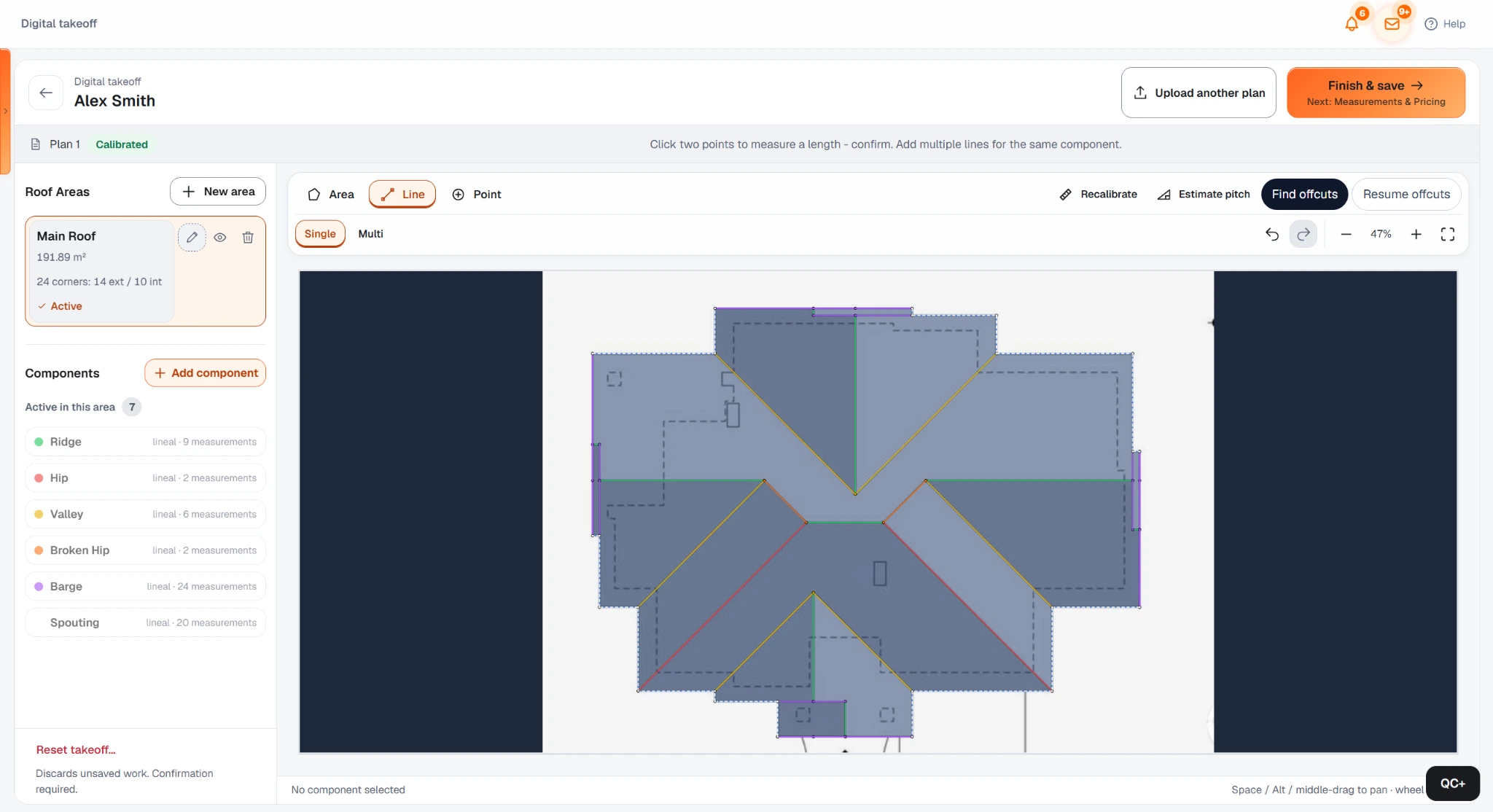
Roof Scan Assist reads a calibrated roof plan, identifies the roof faces and supported roof lines, and builds the takeoff for you. On a clear, correctly calibrated plan, a typical simple-to-medium complexity roof commonly completes both scan stages in around 1-2 minutes, and simple roofs can be faster.
Direct answer
Identify the visible roof planes and turn them into measured areas inside the takeoff.
Detect supported ridges, hips, valleys, barges and spouting where the source drawing is clear enough.
Review the result, fix a line in seconds, add what is missing or switch to manual takeoff without changing tools.
Save attention, not only minutes
Set the scale from a reliable known dimension.
Choose the scan option that matches the roof complexity.
Answer an email, make a call or move another task forward while the scan processes.
Return to the completed geometry and inspect the areas and roof lines.
Correct the small exception if there is one, then continue to the next step.
Two scan stages
The first scan traces the external roof outline, including the eave or gutter and barge or rake boundaries. You review that outline before continuing.
Draw the internal roof components manually, or ask Roof Scan Assist to detect them in a second scan. Both paths keep the result in the same editable workspace.
Suits straightforward geometry. Generally processes faster and uses fewer scan tokens.
A middle option for average roof complexity where more interpretation is useful.
For geometry with more to interpret. Can take longer and consumes more scan tokens.
A scan does not lock you into what the model decided. Every area and supported roof line remains part of the normal Digital Takeoff workspace.

One connected workflow
Upload or open the drawing and calibrate it.
Scan the outside outline first, review it, then draw internal components yourself or scan them in a second stage.
On long-run roofs with angled cuts, generate a suggested cut plan and material requirement.
Apply your saved materials, labour, waste and pricing logic.
Build the customer-facing quote from the same measured job.
Roof takeoff on mobile
Work from the same roof-plan workflow on a phone when that is the device in front of you.
Start the automated geometry scan on mobile, then come back to the measured result instead of tracing every line on a small screen.
The detected roof is still editable takeoff geometry that continues into the rest of the QuoteCore+ workflow.
Skill barrier
Use the scan to remove repetitive tracing and spend your attention checking unusual geometry or pricing the job.
Calibrate the plan, run the scan and prepare the measured roof for review without knowing how to draw every hip and valley manually.
Use the editable result to learn what the roof geometry should look like while an experienced person reviews the commercial work.
Accuracy
Set the plan scale from a reliable known dimension. A good geometry result with the wrong scale still produces the wrong real-world measurements.
Sharp, readable roof lines are easier to interpret than blurred scans, compressed images or overlapping construction markup.
Simple and moderately complex roofs are more predictable. Unusual intersections are more likely to need manual judgement.
Good fit, clear limits
QuoteCore+ is built around a connected measure-to-price workflow. It is deliberately not trying to replace every piece of software in a construction business.
Try it on a roof plan
Use the focused roof takeoff demo and see the AI-assisted plan workflow without creating a paid account.
Try Roof Scan AssistTell us how your team measures and quotes roofing and we will show the workflow around your use case. No obligation.
Book a tailored demoChoose the Digital Takeoff and Roof Scan Assist usage that suits your volume and see the resulting monthly subscription.
See pricingFAQ
Practical answers about how QuoteCore+ fits into real estimating, takeoff and quoting workflows.
Software interprets a roof plan and builds measured roof geometry automatically. QuoteCore+ leaves that geometry editable for review rather than returning a static report.
Yes. Roof Scan Assist is available in the mobile Digital Takeoff experience as well as on desktop. It scans roof plans and drawings from the phone; it is not a camera or satellite scan of the physical roof.
No. Roof Scan Assist is designed for roof plans and drawings. It is not a satellite report or camera-based physical roof scanner.
There is no single percentage for every drawing. Correct calibration, source-plan clarity and roof complexity are the main variables that determine how much review or correction the result needs.
It can reduce hands-on attention even when manual tracing is already fast. On a clear, correctly calibrated plan, a typical simple-to-medium complexity roof commonly completes both scan stages in around 1-2 minutes, and simple roofs can be faster. You can use that short window for another task, then review and fix only what needs correction.
Yes. Each of the two scan stages can use the level that suits that part of the roof. For example, use Simple for an easy outside outline and Medium+ for more complicated internal geometry. Heavier processing can take longer and use more scan tokens, so you do not need to spend maximum tokens on every stage.
The first scan traces the outside roof outline, including the eave or gutter and barge or rake boundaries. You review that outline first. Then you either draw the internal roof components manually or run the second scan to find them. You can choose Simple, Medium or Medium+ independently for each stage.
Yes. Correct, add, continue manually or discard the automated result in the same workspace. The normal Digital Takeoff tools remain available at every stage.
Related
QuoteCore+
Use Roof Scan Assist when the plan suits automation, keep every result editable and move the reviewed roof straight into the next estimating step.