
Roofing estimating software that measures, calculates, and prices in one workflow.
Measure roofs digitally with AI Scan Assist, calculate materials and labour automatically with Smart Components™, and turn estimates into quotes without re-entering data. Plans from free to $59/month.
Free tools with no signup. 30-day money-back guarantee.
Measure the roof yourself
Upload a plan or image and measure roof areas, ridges, hips and valleys - in square feet, roofing squares or m². Try the free roof takeoff tool →
Already have the roof measurements?
From a site measure, plan takeoff, aerial/satellite image or a third-party measurement report - Smart Components calculate materials, labor, waste, pitch and selling price. Open Measurement-to-Quote →
What is roofing estimating software?
Roofing estimating software helps contractors measure roof areas, calculate material quantities, apply labour costs, and produce accurate pricing for a job before a quote is sent.
Traditional estimating often means scaling rulers on paper plans, entering numbers into spreadsheets, and manually calculating waste, pitch adjustments and material counts. Every step is a chance for an error, and the same calculations get repeated on every job.
QuoteCore+ replaces that process with a connected estimating workflow. Digital takeoff tools measure the roof. Smart Components™ apply your stored materials, labour, waste and pricing rules automatically. The estimate becomes a quote without manual re-entry, and the same data carries through to material orders and invoices.
However you measure - square feet, roofing squares or square metres, shingles, metal roofing or membrane, your own labor rates in dollars per square or per m² - the estimating rules are yours. Build your roofing estimate, then send it as a quote, bid or proposal without re-entering data. For the measurement side, see roofing takeoff software; for the broader workflow, contractor estimating and quoting software.
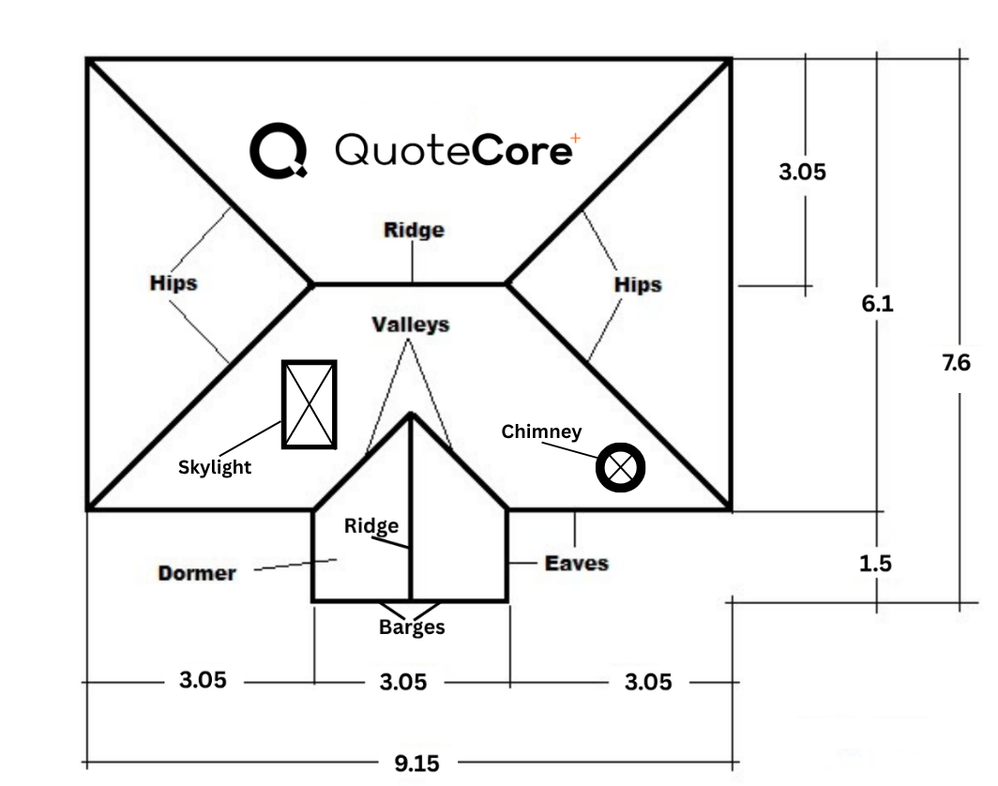 Interactive demo
Try our real system in 30 seconds or less
Scan this sample roof plan with AI or measure it yourself - the same takeoff workstation that's in the app. No sign-in needed.
Key estimating features
The tools that make estimating faster and more accurate in QuoteCore+.
Digital roof takeoff
Measure roof areas, lengths and pitch from uploaded plans. Handles angles, complex geometry and multiple roof sections.
AI Scan Assist
Automatically identifies roof areas, ridges, hips, valleys, barges and spouting from an uploaded plan. Review and adjust before pricing.
Smart Components™
Save materials, labour, waste, pitch calculations and pricing rules as reusable components. Drop them into any estimate.
Material ordering
Turn estimate quantities into a material order with supplier details carried over. No re-keying from the quote.
How estimating works in QuoteCore+
From plan upload to priced estimate in four steps.
Upload plans or use AI scan
Upload a roof plan, satellite image or drawing. Use AI Scan Assist to identify roof areas, ridges, hips, valleys, barges and spouting automatically, or measure manually with digital takeoff tools.
Measure roof areas, lengths and pitch
Name each roof area, assign pitch and material type. Digital takeoff handles angles, pitches and complex roof geometry. Adjust any measurement manually before moving to pricing.
Smart Components apply materials, labour, waste and pricing
Measurements feed directly into Smart Components, which apply your saved materials, labour rates, waste allowances and pricing rules automatically. No manual re-entry, no spreadsheet formulas.
Review, adjust and send as a quote
Check the estimate, adjust quantities or pricing, then send it to the customer as a professional quote. The same data carries through to material orders and invoices if the quote is accepted.
What QuoteCore+ estimates
Roofing-specific measurement types handled by the estimating workflow.
- ✓Roof areas (m², sq ft, roofing squares)
- ✓Ridge, hip, valley and barge lengths
- ✓Spouting and guttering lengths
- ✓Material quantities with waste allowances
- ✓Labour costs based on your rates
- ✓Pitch-adjusted surface areas
What QuoteCore+ does not do
No CRM or lead generation
QuoteCore+ handles the estimating-to-invoice workflow. It does not manage sales pipelines, marketing campaigns, or customer acquisition.
No accounting or tax returns
Estimates and invoices are created and tracked, but QuoteCore+ does not handle VAT/GST returns, profit and loss, or balance sheets. Use accounting software for that.
No payment processing
Invoices include payment instructions, but QuoteCore+ does not process card or bank payments directly. Customers pay via bank transfer, Stripe links or PayPal links configured per invoice.
When QuoteCore+ may not be the right fit
You only need a basic material calculator
If you estimate a few jobs a month with a simple spreadsheet or calculator and that works for you, QuoteCore+ may be more than you need. It adds the most value when you estimate frequently and want a connected workflow from measurement to invoice.
You need full project management
QuoteCore+ handles estimating, quoting, material ordering and invoicing, not construction project management. If you need scheduling, Gantt charts, or resource allocation, use dedicated project management software.
Common questions
Can QuoteCore+ estimate roofing materials from a plan?
Yes. Upload a roof plan and use digital takeoff tools or AI Scan Assist to identify roof areas, ridges, hips, valleys, barges and spouting. Measurements feed directly into Smart Components, which apply your stored materials, quantities, waste allowances and pricing rules to produce a material estimate automatically.
How accurate is AI Scan Assist for estimating?
AI Scan Assist identifies roof areas, ridges, hips, valleys, barges and spouting from an uploaded plan. It speeds up the measuring process significantly, but results should always be reviewed and adjusted manually before finalising an estimate. QuoteCore+ gives you full control to correct any measurement before it becomes part of a quote.
Can I reuse estimating rules across jobs?
Yes. Smart Components let you save materials, labour, waste allowances, pitch calculations, drawings and pricing rules as reusable building blocks. Once configured, the same components can be dropped into any future estimate, so you are not rebuilding pricing logic from scratch for every job.
Does QuoteCore+ handle waste allowances?
Yes. Waste allowances can be built into Smart Components as a percentage or fixed quantity. When a component is used in an estimate, the waste is calculated automatically and included in the material quantities and pricing.
Can I estimate labour costs, not just materials?
Yes. Smart Components can store labour rules alongside materials. Labour rates, time estimates and crew sizing can all be configured per component, so labour costs are calculated automatically as part of the estimate.
How is estimating different from quoting in QuoteCore+?
Estimating is the process of measuring, calculating quantities and pricing a job. Quoting is turning that estimate into a professional document you send to a customer for approval. In QuoteCore+, both happen in one connected workflow: your measurements and pricing become a quote without manual re-entry, and the same data carries through to material orders and invoices.
Related
Already use Xero? Prepare the measurements and pricing in QuoteCore+, then send quote information across. See the QuoteCore+ Xero integration.
RoofSnap alternative
How the two roofing measure-and-quote workflows compare.
Roofr alternative
Broad roofing CRM vs focused estimating workflow.
STACK alternative for roofing
Multi-trade estimating platform vs roofing-native workflow.
HOVER alternative
Generated 3D measurement vs owned plan takeoff.
Bluebeam alternative for roofing
Configurable PDF takeoff vs roofing-native estimating.
Roofing takeoff software
Measure roof plans digitally and calculate material quantities.
Roofing quoting software
The full quote-to-invoice workflow for roofing contractors.
Construction quoting software
Quoting tools for construction and other measured trades.
Digital roof takeoff
Measure roof plans digitally with AI-assisted scanning.
AI Scan Assist
Automatic identification of roof areas, ridges, hips and valleys.
Smart Components™
Reusable components that store pricing, labour, waste and quantities.
Free tools
Roofing calculators, quote and invoice generators - free, no signup.
How to do a roof takeoff
Step-by-step guide to measuring a roof from plans.
How to measure a roof
Methods and tools for accurate roof measurement.
How much roofing material
Calculating material quantities for a roofing job.
Roofing waste calculation
How to calculate and apply waste allowances in estimates.
Estimate. Quote. Build.
Stop estimating in spreadsheets and re-entering the same data into a quote. QuoteCore+ gives you one connected workflow from measurement to final payment.
Get started with QuoteCore+Free tools, no signup. 30-day money-back guarantee on paid plans. See pricing.