
Skip to content

AI estimating assistant for contractors - V1 Beta

Tell your estimating software what you want done.

Smart Assistant gives QuoteCore+ a conversational interface. Use voice or text instead of learning where every screen, field and action lives. In V1 Beta it can draft or revise quotes, retrieve authorised account information and propose supported pricing changes, with the result left for you to review.

Voice or textBuilt for mobile and desktopReview, edit or discard the result
QuoteCore+ Smart Assistant alongside the estimating workspace
Smart Assistant is a conversational controller for the QuoteCore+ workflow, not a separate generic chatbot or voice note tool.

Why this matters

The easiest way to use complex software can be to stop navigating it.

Traditional estimating software makes the user learn the interface first: find the job, open the right screen, locate the right field, make the change and move to the next screen. A conversational layer lets the user start with the outcome instead.

Say what you need

Describe the quote, change or information you want in normal language by voice or text.

Let the app find the path

For supported tasks, Smart Assistant works with the relevant QuoteCore+ account context instead of making you navigate there first.

Keep control of the result

Review the draft, answer or proposed change. Edit it, continue the conversation or discard it when it is not right.

A different interface

Ask for the outcome instead of remembering the clicks.

Smart Assistant is most useful when the task is easier to explain than the software path needed to complete it.
  1. 01

    Ask

    Use voice or text to describe the task or information you need.

  2. 02

    Understand context

    The assistant works with supported, authorised information already inside QuoteCore+.

  3. 03

    Draft or propose

    Prepare the quote draft, retrieve the answer or propose the supported change.

  4. 04

    Review

    Check the measurements, pricing and commercial details that matter.

  5. 05

    Continue

    Approve the manual next step today, or use broader assistant actions as they become available in V2.

Create a quote draft by talking through the job.

Voice estimating is useful because contractors already know how to explain a job. Smart Assistant lets that explanation become structured work inside QuoteCore+ rather than another note that somebody has to type up later.

  • Describe the work by voice or text
  • Use the measurements and job information you already have
  • Revise the same draft as the conversation continues
  • Keep your configured pricing logic and final review in the workflow
Preparing a quote draft by voice with QuoteCore+ Smart Assistant
Describe the work naturally, then review the resulting draft instead of building every line from a blank screen.

The smaller the screen, the more useful conversation becomes.

A full estimating and quoting app has a lot of screens because the job itself has a lot of moving parts. On mobile, asking for the task can be far easier than tapping through that structure.
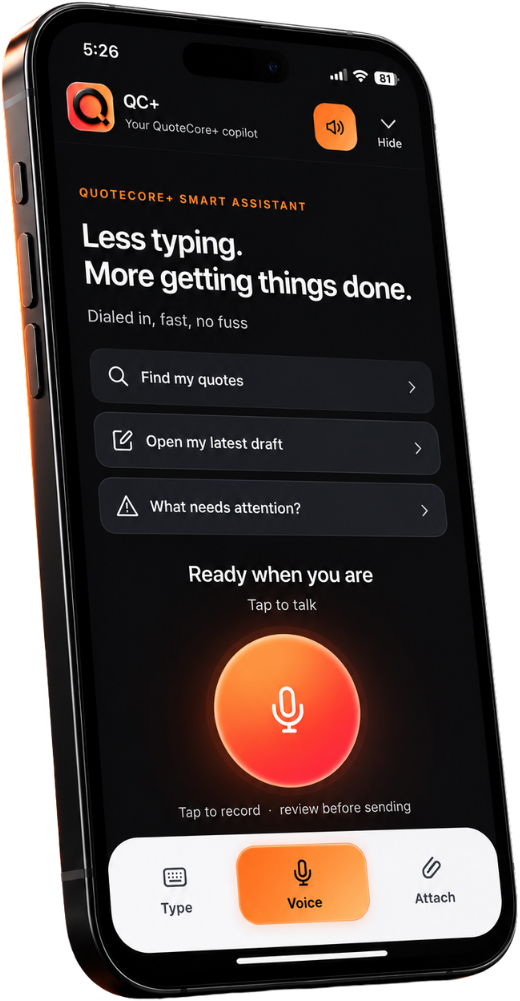
  • Use voice when typing is inconvenient
  • Ask for a quote or job detail without opening record after record
  • Prepare supported draft work while you are away from the desk
  • Return to the normal QuoteCore+ screen whenever you want direct control
Smart Assistant used on a mobile phone
On a phone, voice and text can replace a surprising amount of small-screen navigation.

Real contractor use cases

A useful assistant should remove admin, not invent work for itself.

These are practical moments where a conversational controller can reduce interface knowledge, typing and repetitive navigation without hiding the commercial result.
On site

Capture it while it is fresh

Talk through measurements or job details and prepare a draft while the information is fresh instead of rebuilding the note later.

In the office

Ask instead of searching

Ask for the latest quote total, job detail, order, invoice or status without opening several records to find it.

Maintaining pricing

Describe the change

Describe a supported Smart Component or pricing change and review the proposed update instead of hunting through settings first.

Training and delegation

Let juniors ask

Let less-experienced team members ask for supported tasks while an authorised person continues to review the important pricing and customer decisions.

Ask about the job instead of searching through the job.

Smart Assistant is connected to the supported QuoteCore+ account context. It can be useful when the question is simply, "What was that total?", "Which job needs attention?" or "What is the current status?"

  • Quote totals and quote details
  • Job information and measurements
  • Order or invoice information
  • Current statuses and attention items
Smart Assistant answering a question about job information
The assistant can bring authorised account information back into view without making you remember where every detail is stored.

Your pricing should stay yours, even when AI helps operate it.

Many AI estimate generators build a price from generic data. QuoteCore+ is designed around your own Smart Components, materials, labour and pricing logic.
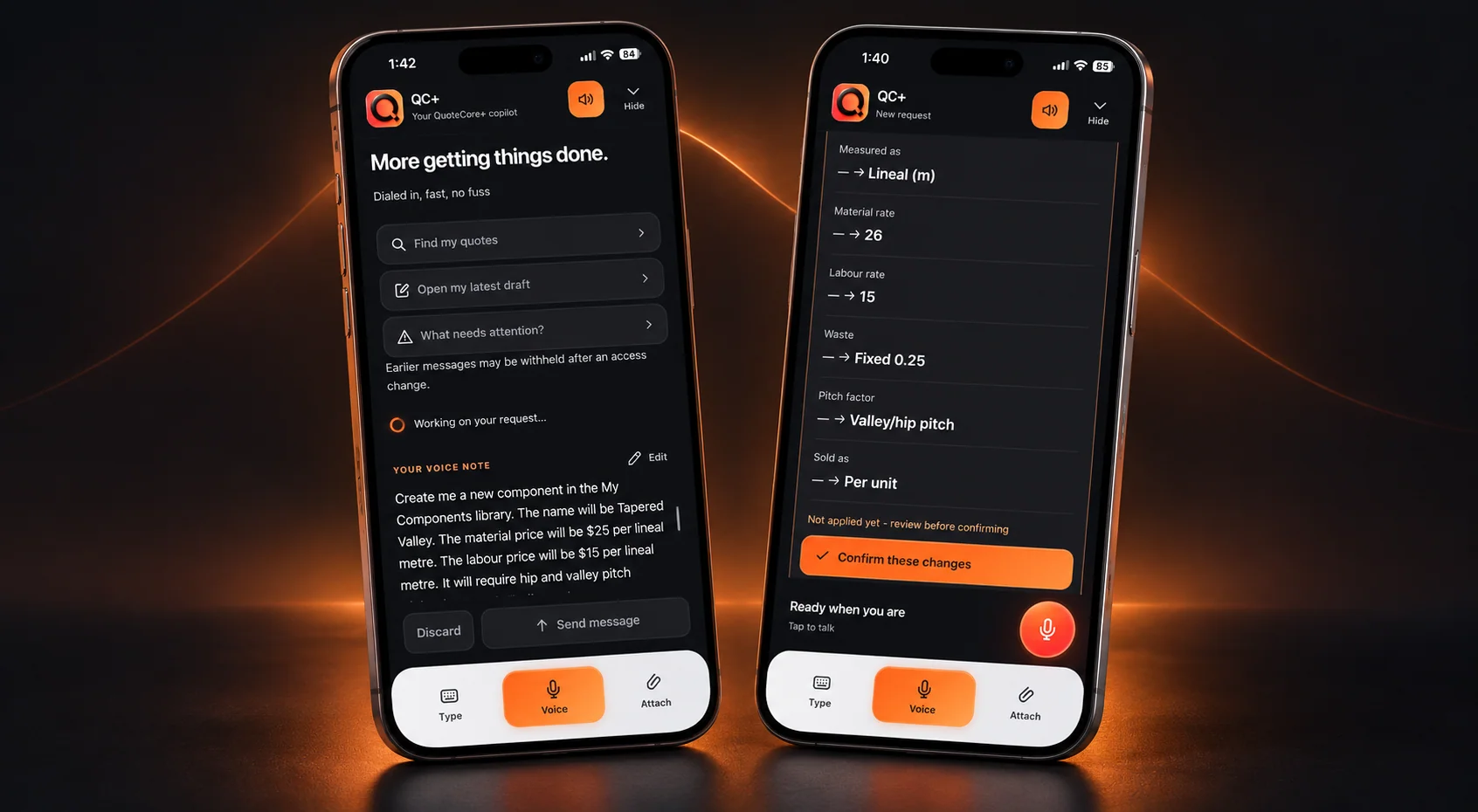
  • Work with your saved QuoteCore+ account context
  • Propose supported material or pricing changes
  • Review what is changing before it is used
  • Keep the underlying Smart Components visible and editable
Explore Smart Components
Smart Assistant proposing a supported pricing component change for review
Supported pricing and Smart Component changes can be proposed conversationally, then checked before they are used.

V1 Beta today

Draft, retrieve and propose now. Broader actions are coming in V2.

We would rather be clear about the current boundary than pretend every conversational request is already autonomous. V1 removes a lot of navigation. V2 is designed to carry more approved work through the next action.
Today

What V1 can do now

Use voice or text to prepare and revise quote drafts, retrieve authorised account information and propose supported pricing or Smart Component changes. The user reviews important commercial work before the downstream action is completed.

Coming soon

What V2 is planned to add

V2 is planned to extend into broader workflow actions such as sending or finalising approved quotes and follow-up scheduling. Until each action ships, V1 Beta remains the source of truth for what the assistant can execute today.

When AI gets it wrong

The fastest workflow is the one that lets you correct the exception without starting again.

Smart Assistant is not useful because it is assumed to be perfect. It is useful because a strong first result can remove a large amount of navigation and typing, while the human keeps the ability to change or reject anything that matters.
Review it

Check the result

Check the job information, measurements, pricing and customer-facing details before relying on the result.

Refine it

Correct the part that needs it

Continue the conversation or use the normal QuoteCore+ interface to correct the part that needs changing.

Discard it

Fall back to manual

If the assistant misunderstood the task, ignore the result and complete the work manually. The normal app remains available.

Good fit, clear limits

An easier way to operate the app, with visible boundaries.

QuoteCore+ is built around a connected measure-to-price workflow. It is deliberately not trying to replace every piece of software in a construction business.

Best fit when

  • Contractors who prefer describing a task to learning every software screen
  • Mobile users who want to do more than view information on a phone
  • Office teams that need faster access to job, quote and pricing information
  • Businesses that want AI assistance while keeping their own pricing logic and review process

Know before you choose it

  • V1 Beta does not yet send or finalise quotes through the assistant
  • V1 Beta does not yet schedule follow-ups through the assistant
  • The assistant only works with supported actions and authorised account information
  • Commercial outputs still need normal user review before they are relied on

Try the easier interface

Use the interactive demo yourself, or let us show how Smart Assistant fits the way your business already quotes.

The prepared demo shows the current QuoteCore+ experience. A tailored screen-share shows where the assistant can remove work for your workflow.

Explore the interactive app demo

Open the prepared roofing workspace and try the current QuoteCore+ experience at your own pace.

Explore the demo

Book a tailored 20-minute demo

Tell us how your team measures, prices and quotes and we will show where the assistant can remove work. No obligation.

Book a tailored demo

Build your configuration

Choose the Smart Assistant allowance that fits how often you expect to use conversational tasks.

See pricing

FAQ

AI estimating assistant and Smart Assistant FAQ

Practical answers about how QuoteCore+ fits into real estimating, takeoff and quoting workflows.

What is an AI estimating assistant?

It lets you describe the task you want completed in normal language instead of navigating every screen manually. Smart Assistant is a conversational controller for the QuoteCore+ workflow, not a separate generic chatbot.

Can I create an estimate or quote by voice?

Yes. V1 Beta can prepare or revise a quote draft by voice or text for review. The draft stays inside the normal QuoteCore+ workflow with your configured pricing logic.

Can I use Smart Assistant on my phone?

Yes. Mobile is one of the strongest use cases because voice or text can be easier than navigating a complex app on a small screen.

Does it use my own pricing?

It works with supported QuoteCore+ account context and Smart Components rather than replacing your pricing with a generic public price list.

Is it just voice-to-PDF software?

No. It can retrieve authorised account information and work with supported pricing changes as well as draft quotes.

What if it gets something wrong?

Review, edit or discard the result. The normal QuoteCore+ interface remains available at every step.

Can it send quotes today?

Not in V1 Beta. Sending and finalising quotes is part of the V2 direction and remains a manual step until it ships live.

QuoteCore+

Stop learning the clicks. Start with what you want done.

Try Smart Assistant by voice or text, keep the result reviewable and use the normal QuoteCore+ interface whenever direct control is the better option.