
15 September 2026
Roofing takeoff and estimating software that connects to Xero

By Shaun, Founder of QuoteCore+. Reviewed 15 September 2026.
Keep Xero. Replace the manual measuring, spreadsheets and retyping that happen before it.
QuoteCore+ connects to Xero so roofing contractors and construction businesses can measure a job, apply their pricing and send quote information into their connected Xero organisation. Prepare the work in QuoteCore+, then use the exported information in Xero as part of your usual workflow.
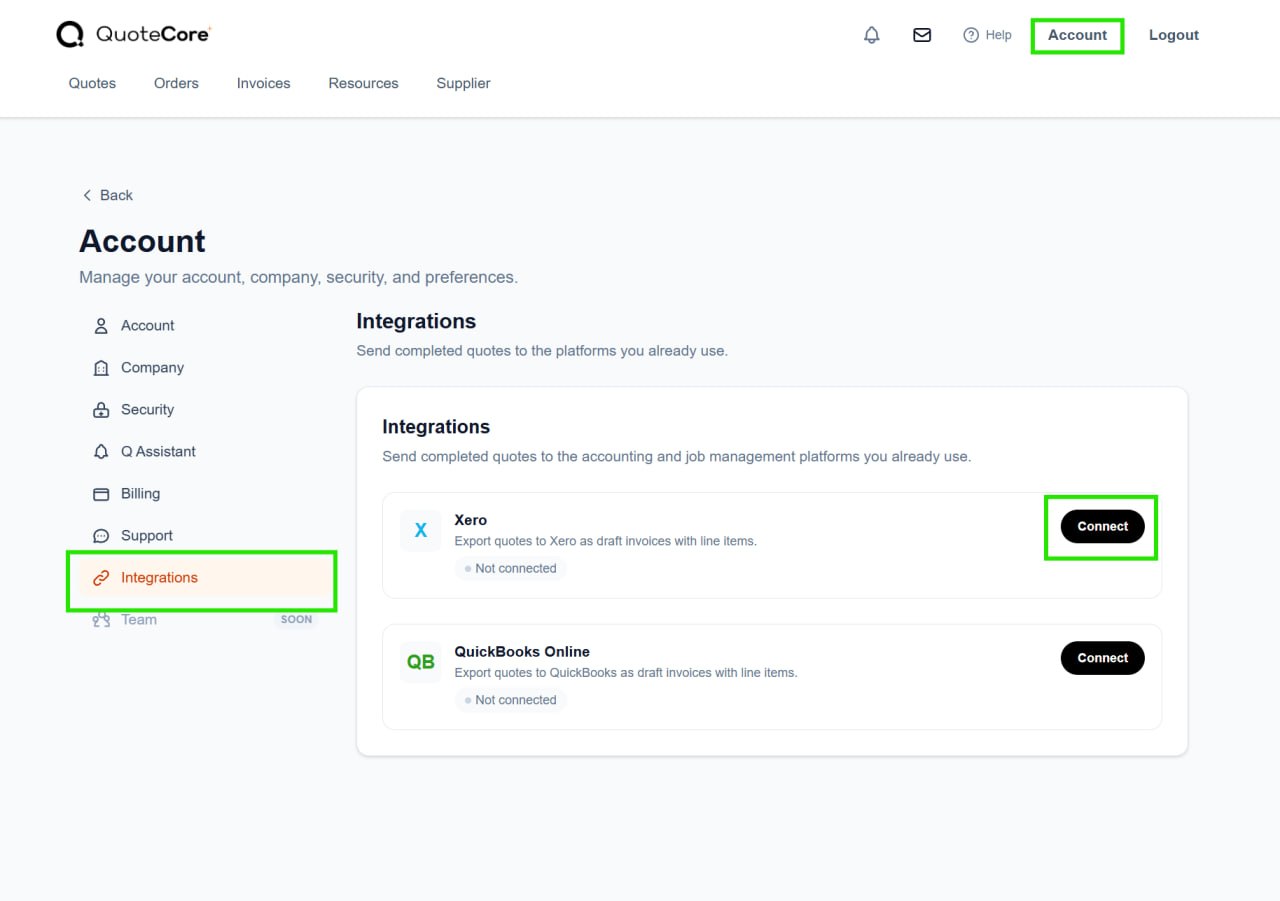
Connect through Account settings → Integrations → Xero → Connect. When you are ready to export, open a quote summary, choose Send to App, then select Xero. The transfer uses the Xero API; this workflow does not require a separate CSV export and import.
Try measuring a roof plan free · See the connection instructions
Keep your accounting system. Improve the work before it.
A roofing quote can start in several places: a printed plan, dimensions written down on site, a satellite measurement report, or an estimating spreadsheet. The difficulty is often what happens next.
You calculate quantities, apply material prices and labour rates, add waste allowances, then move the result into another system. The measurements sit in one file, the pricing logic in another, and the customer document somewhere else.
QuoteCore+ brings the measuring, pricing and quote preparation together. The Xero integration gives you a way to pass the quote information on without rebuilding that hand-off around a spreadsheet or CSV file.
You do not need to replace Xero to change how you prepare roofing estimates.
Three ways to get from roofing measurements to Xero
Measure PDF plans instead of printing them
Start with a plan or suitable image in QuoteCore+ and use digital roof takeoff to measure the job on screen. Check the scale and measurements, then apply your pricing before preparing the quote information for export.
This is the route for contractors who currently print drawings, measure with a scaling ruler and enter the results into a spreadsheet. The measuring and estimating happen before the Xero hand-off; Xero is not being used as the roof-measurement tool.
Start with measurements you already have
Already measured the roof on site or received quantities in an aerial or satellite report? Start with those measurements rather than doing the takeoff again.
Enter the relevant areas, lengths and quantities in QuoteCore+, apply your pricing, and prepare the quote you want to send across. This is a measurement-input workflow, not a promise that QuoteCore+ automatically imports every third-party report format.
The free Measurement-to-Quote Tool lets you try turning existing measurements into a priced result before working in a connected app account.
Replace repeated spreadsheet work with reusable pricing
Your estimating spreadsheet may contain years of useful knowledge: how you calculate material quantities, allow for waste and charge for labour. You should not have to abandon that logic just to change the workflow around it.
Smart Components™ let you configure reusable measurement and pricing rules in QuoteCore+. Apply those rules to the next job, review the resulting quote, and send its information to Xero.
This is an alternative to rebuilding estimates and copying their results between systems. Existing spreadsheet formulas may need to be recreated and checked when you set up components; importing a price list is not the same as automatically translating an entire workbook.
How the QuoteCore+ Xero integration works
Measure or enter quantities → apply your pricing → prepare a QuoteCore+ quote → Send to App → Xero.
The export starts from a quote in your QuoteCore+ account. You choose the quote and initiate the transfer. Think of it as a controlled hand-off of quote information, rather than a promise that every part of both apps continuously synchronises.
| Part of the workflow | What you do |
|---|---|
| Connection | Authorise the connection to Xero from your QuoteCore+ account settings. |
| Starting point | Open the quote summary you want to export from the Quotes section. |
| Export action | Select Send to App, then Xero. |
| Direction shown in this guide | QuoteCore+ to Xero. |
| Final check | Find the exported record in Xero and review it before continuing your customer workflow. |
What the export creates in Xero
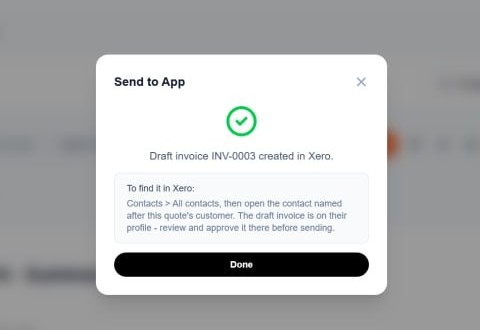
When you send a quote to Xero, QuoteCore+ creates a draft invoice with line items in your connected Xero organisation. The draft invoice is created against a contact named after the quote’s customer, and it stays in draft status until you review and approve it in Xero. The export itself does not email your customer and does not send or approve anything on your behalf.
To find the draft invoice in Xero:
- Open Xero and go to Contacts, then All contacts.
- Open the contact named after the quote’s customer (in our demonstration, the demo customer created for this test).
- The draft invoice appears on that contact’s profile, with the line items transferred from your quote.
- Review the details and totals, then approve and send it from Xero when you are ready, as part of your normal Xero workflow.
Line items from your quote carry across as invoice lines, so the draft invoice reflects the priced quote you reviewed in QuoteCore+. Treat the first export as a check of the complete workflow: compare the source quote with the result in Xero, including the information and totals you expect to use.
Before you connect
You need a QuoteCore+ account, access to the Xero organisation you want to connect, and permission to authorise that connection. Sign in to the correct accounts before starting.
The no-signup tools let you try measurement and pricing separately. Connecting Xero and using Send to App happen inside your QuoteCore+ account, not inside an anonymous free-tool session.
Connect QuoteCore+ to Xero
- Sign in to your QuoteCore+ account and open Account settings.
- Select Integrations.
- Open Xero and select Connect.
- Complete the Xero sign-in and authorisation steps that open. Check that you are connecting the correct Xero organisation, selecting it if prompted.
- Return to QuoteCore+ and check that the connection has completed before exporting a quote.
The connection uses Xero’s OAuth authorisation flow. Sign in through the Xero screen rather than entering your Xero password into a QuoteCore+ quote or message.
Send quote information from QuoteCore+ to Xero
- In QuoteCore+, open Quotes.
- Select the quote summary you want to send.
- Review the quote you have selected, including the customer and pricing.
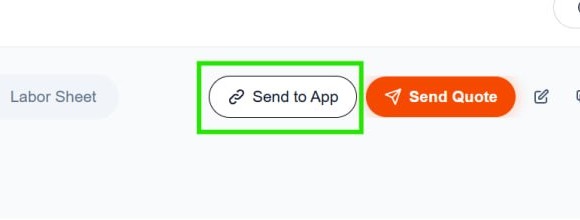
- Click Send to App.
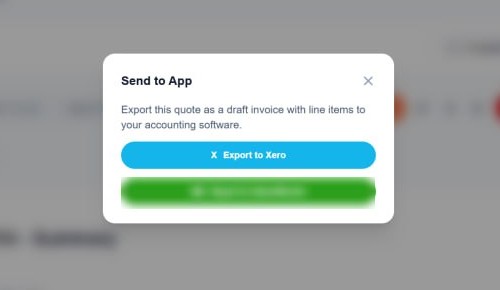
- In the pop-up window, select Export to Xero to send that quote’s information to the connected organisation.
- Open Xero, locate the exported draft invoice and check it before using it in your normal workflow.
Find the exported data in Xero
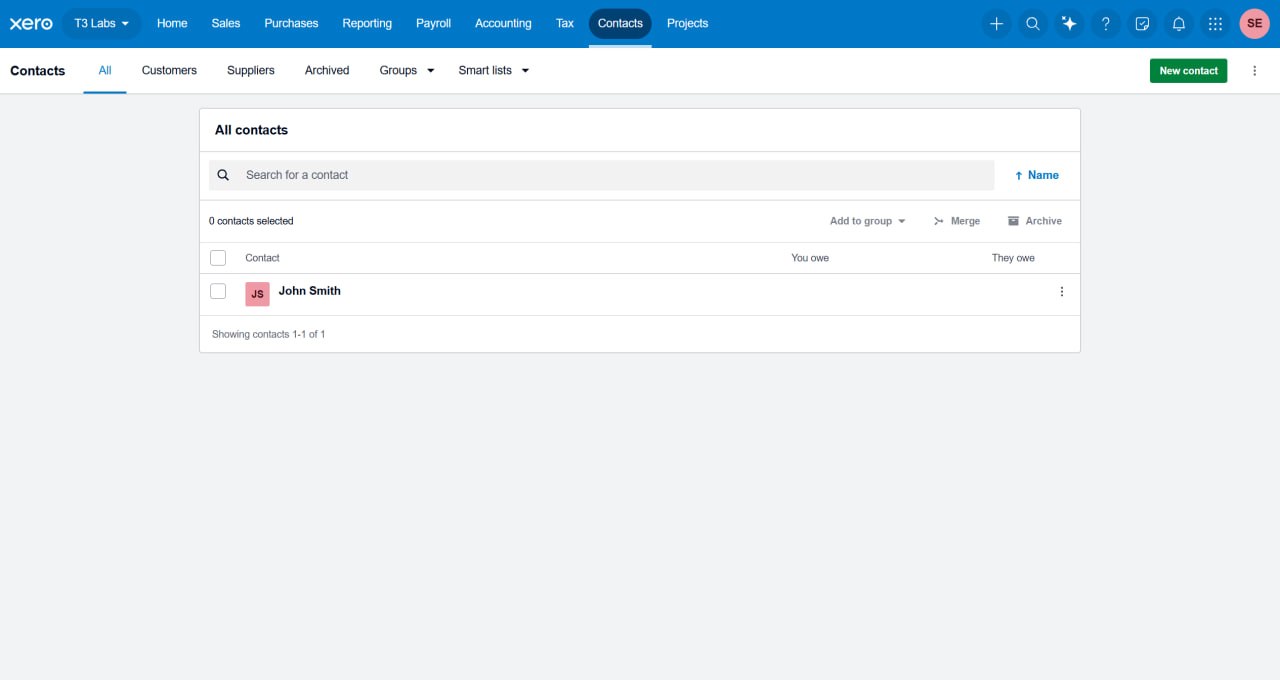
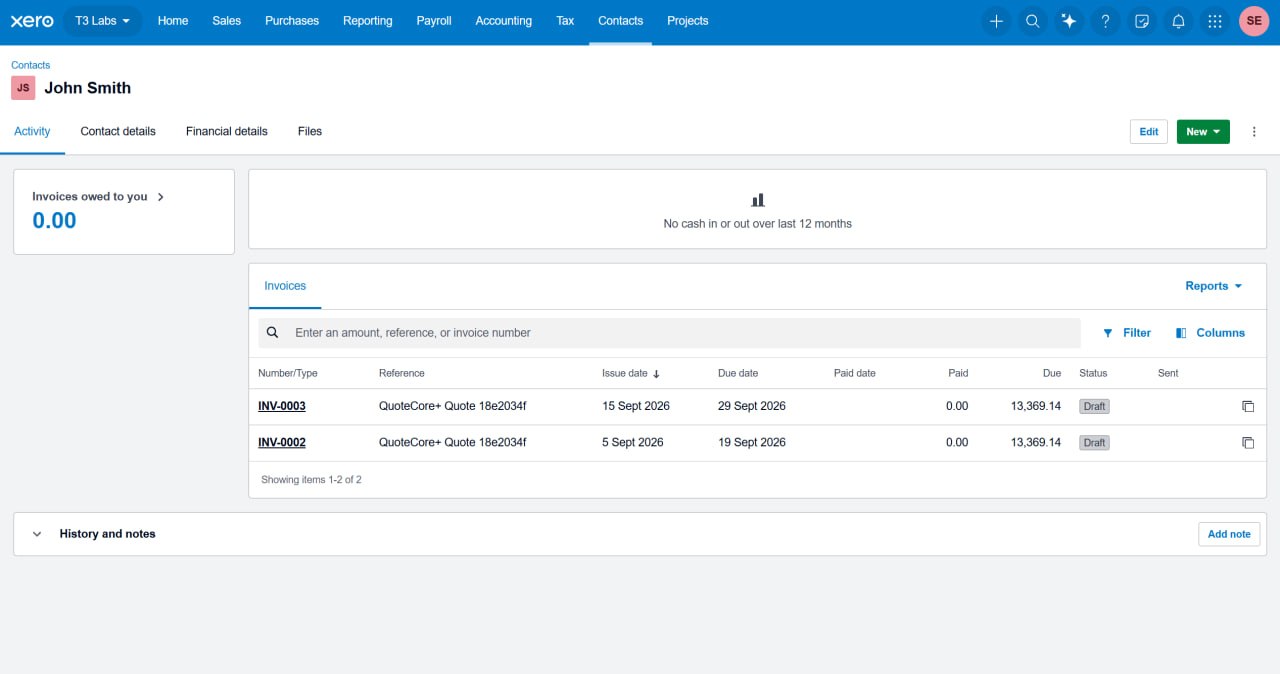
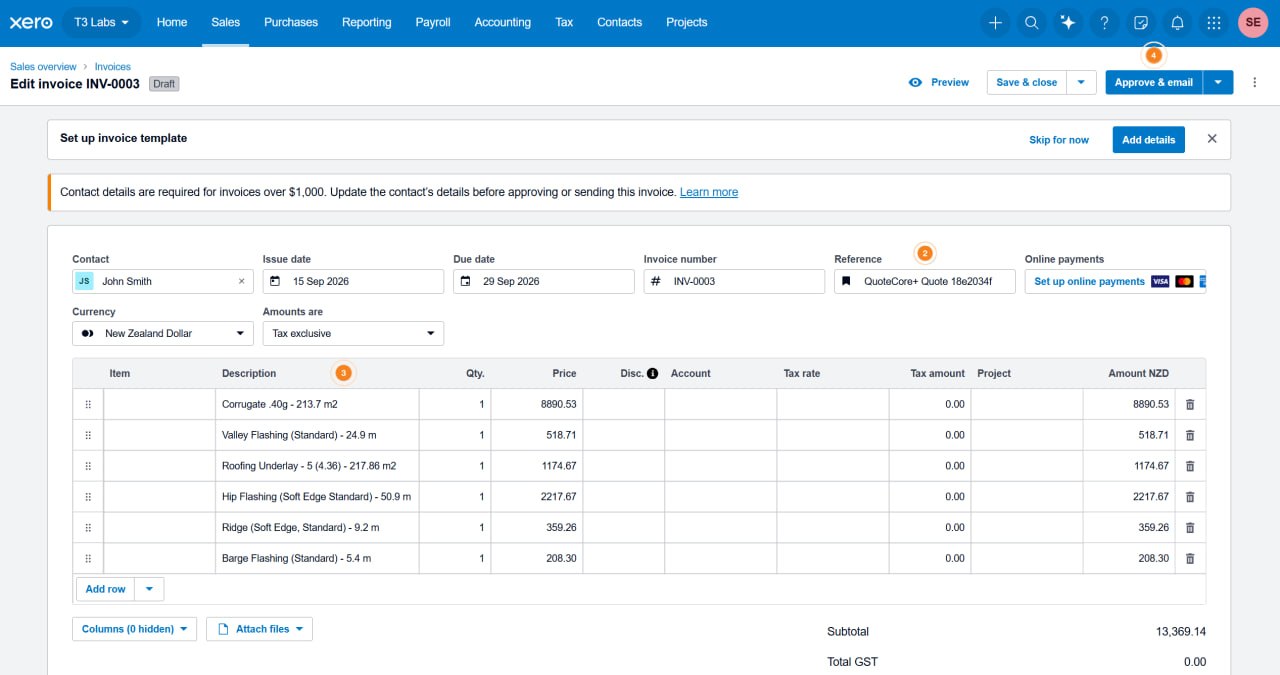
The screenshots below show the complete journey from the Xero contacts list to the exported draft invoice, using a demonstration job.
Step 1: open the customer’s contact. In Xero, go to Contacts → All contacts and find the contact named after the quote’s customer. Each export creates or updates this contact record automatically.
Step 2: check the contact’s invoices. Open the contact and stay on the Activity tab. Every export from QuoteCore+ appears here as an invoice with a Draft status and a reference in the form QuoteCore+ Quote …, so you can tell which QuoteCore+ quote each invoice came from.
Step 3: review the draft invoice. Open the draft invoice to see the exported line items: each component from your quote carries across with its description, quantity and price, and the subtotal matches the priced quote you reviewed in QuoteCore+. When everything checks out, approve and send it from Xero as part of your normal workflow.
What to check before relying on an export
The quote you start with, the draft invoice created in Xero and the customer document you eventually send are related, but they are not automatically the same thing.
Confirm that the receiving organisation is correct, review the transferred line items and check the final totals. If you later change the QuoteCore+ quote, do not assume an existing Xero record has changed with it. Check the current result before exporting again or continuing in Xero.
Not seeing the result? Check the connection under Account settings → Integrations, confirm which quote you selected, and read any message shown after the send action. Before repeating an export, look in Xero to avoid unintentionally creating another record. Contact QuoteCore+ support when you need help identifying what happened.
Frequently asked questions
Does QuoteCore+ integrate with Xero?
Yes. You can connect your QuoteCore+ account to Xero through account settings, then open a quote summary and use Send to App → Export to Xero to create a draft invoice with line items through the API.
Can I use roofing estimating software without replacing Xero?
Yes. Use QuoteCore+ for the measurement, pricing and quote-preparation work, then send the quote information to Xero as a draft invoice. This lets you improve the estimating workflow while keeping Xero for accounting.
What does QuoteCore+ create in Xero?
A draft invoice with line items, created against a contact named after the quote’s customer. Nothing is sent to your customer by the export; you review, approve and send from Xero yourself.
Can I send a roof takeoff straight to Xero?
The workflow described here sends information from a QuoteCore+ quote. Measure the job, apply your pricing and prepare the quote, then export from its summary. It is not a raw drawing or roof-geometry export.
Can I use measurements from a satellite report or site visit?
Yes. Start with measurements you already have and apply your pricing in QuoteCore+. The source can be a site measure, an existing takeoff or quantities from a report; you do not need to measure the roof again simply to use the pricing workflow. Check the source measurements and assumptions before using them in an estimate.
Do I need to export a CSV and import it into Xero?
No. This connected workflow uses Send to App → Xero to transfer quote information through the API. It is separate from manually downloading and importing a CSV file.
Is this a two-way sync between QuoteCore+ and Xero?
This guide covers a transfer you initiate from QuoteCore+ to Xero. Do not treat that as a promise of two-way synchronisation, automatic updates after edits, or payment-status updates back into QuoteCore+.
Can I try the measurement and pricing tools without signing up?
Yes. Try the free roof takeoff tool for plan measurement or the Measurement-to-Quote Tool for pricing existing quantities. To connect Xero and export from a saved quote, use your QuoteCore+ account.
Try the part of the workflow you want to improve
Still printing plans? Measure a roof plan free.
Already have the measurements? Try turning them into a priced estimate.
Ready to keep your jobs and pricing together? Explore QuoteCore+ account options, or open the app and connect Xero from your account settings.
Keep Xero. Make the measuring, estimating and hand-off easier.
Ready to quote faster?